Video Stream Settings
Overview
Video Stream Settings define how ITVDesk encodes, transcodes, exposes, and delivers live video streams to ONVIF clients, VMS/NVR systems, RTSP players, and HTTP snapshot consumers.
These settings apply after a camera and media source have been created and represent the final stage of the video pipeline.
Using these controls, you can:
- Create and manage multiple stream profiles
- Perform live transcoding (resolution, FPS, bitrate, codec)
- Control snapshot generation and access
- Secure or allow remote ONVIF management by NVR systems
- Tune performance and bandwidth usage in real time
All changes are applied live, without restarting ITVDesk or interrupting the RTSP service.
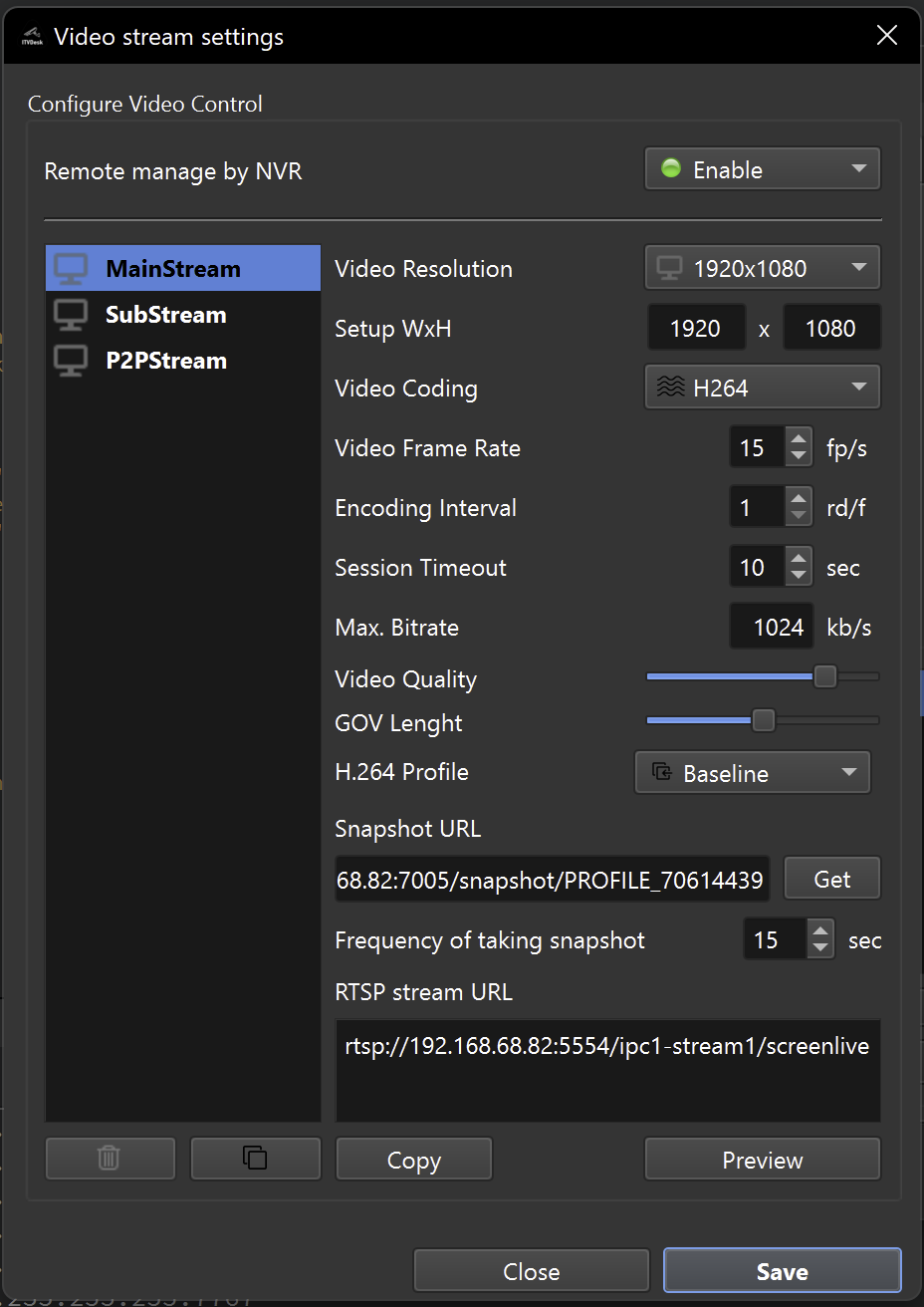
Stream Profiles
ITVDesk supports multiple video stream profiles per camera, similar to professional hardware IP cameras.
Available profiles include:
- MainStream – Primary, high-quality stream
- SubStream – Lower-bitrate stream for remote or mobile viewing
- P2PStream – Optimized for P2P or remote access
Each profile is:
- Independently configurable
- Exposed via its own RTSP URL
- Managed as a separate ONVIF media profile
Typical usage
- MainStream → recording, monitoring, analytics
- SubStream → low-bandwidth preview, WAN access
- P2PStream → remote/cloud connectivity
Live Transcoding Behavior (Important)
All changes made in Video Stream Settings are applied as live transcoding.
This means that ITVDesk will re-encode the stream in real time when you change:
- Resolution (WxH)
- Frame rate (FPS)
- Bitrate
- Codec (H.264 / H.265 / MJPEG)
- GOP / encoding interval
- Video quality
This applies regardless of the original media source:
- Screen capture
- Application window
- External IP camera
- Livestream Pusher
- Media from file
ITVDesk always outputs the configured stream profile, not the original source format.
Video Encoding Settings
Each stream profile exposes the following parameters.
Video Resolution
You can select:
- Predefined resolutions (e.g. 1920×1080)
- Custom width × height values
Resolution can:
- Match the source
- Be downscaled or upscaled (live)
Impact:
- Higher resolution → higher CPU usage and bandwidth
- Lower resolution → better performance and lower latency
Video Codec
Supported codecs:
- H.264 (recommended, highest compatibility)
- H.265 (higher compression, lower bandwidth)
- MJPEG
- JPEG (snapshot-style stream)
H.264 Baseline is recommended for maximum NVR and ONVIF compatibility.
Frame Rate (FPS)
Defines how many frames per second are encoded.
Typical values:
- 10 FPS – low bandwidth, monitoring
- 15 FPS – balanced
- 25 FPS – smooth motion
Lower FPS:
- Reduces CPU usage
- Reduces bandwidth
Encoding Interval (GOP)
Controls how often keyframes (I-frames) are generated.
- Short GOP → faster seeking, better snapshots
- Long GOP → lower bitrate, higher compression efficiency
Max Bitrate
Limits the maximum bitrate in kb/s.
- Can be fixed or auto-managed
- Essential for WAN, LTE, or constrained networks
- Prevents NVR overload
Video Quality
Fine-tunes compression efficiency.
- Higher quality → better image, higher bitrate
- Lower quality → smaller stream size
H.264 Profile
Available profiles:
- Baseline – maximum compatibility
- Main
- High (if supported by client)
Baseline is safest for mixed VMS environments.
Snapshot Configuration
ITVDesk can generate JPEG snapshots independently of RTSP streaming.
Snapshot URL
Each profile exposes an HTTP snapshot endpoint, for example:
http://192.168.68.83:7001/snapshot/PROFILE_ID
Snapshots can be used for:
- VMS previews
- Web dashboards
- POS overlays
- Thumbnails and status monitoring
Snapshot Interval
Defines how often snapshots are refreshed.
Typical values:
- 5–15 seconds → near-live preview low CPU/HDD
- 15 seconds → default
Snapshots are generated when an RTSP client is connected.
RTSP Stream URL
Each stream profile exposes its own RTSP URL, for example:
rtsp://192.168.68.82:5554/ipc1-stream1/screenlive
RTSP streams are compatible with:
- VMS systems
- NVR devices
- ONVIF clients
- RTSP players (VLC, FFplay)
Remote Management by NVR
The Remote manage by NVR option controls whether external ONVIF clients are allowed to modify stream settings.
When enabled
- ONVIF clients (NVR/VMS) can change:
- Resolution
- FPS
- Bitrate
- Encoding parameters
- Changes are synchronized with ITVDesk
- ITVDesk behaves like a physical ONVIF camera
When disabled (security mode)
- All incoming ONVIF configuration commands are blocked
- External devices cannot modify:
- Video profiles
- Encoding parameters
- Stream configuration
- Stream settings are locked locally in ITVDesk
This is strongly recommended when:
- ITVDesk acts as a central stream gateway
- Security and configuration integrity are critical
- Multiple external systems connect to the same stream
Audio Stream (Overview)
Audio settings are managed together with video profiles.
Supported codecs include:
- G711A / G711U
- G722
- G726
- AAC
- OPUS
Audio options:
- Enable or disable per profile
- Mono or stereo
- Configurable sample rate and bitrate
- Two-way audio support (if enabled)
Detailed audio configuration is covered in a separate section.
Performance Notes
- Encoding uses a GPU-accelerated pipeline when supported (with automatic CPU fallback)
- Each stream profile consumes resources independently
- Live transcoding increases GPU/CPU usage proportionally to profile count and quality
Best practices:
- Use one MainStream + one SubStream
- Avoid unnecessary high resolutions
- Lower FPS for WAN or mobile access
- Disable unused profiles
Summary
Video Stream Settings allow ITVDesk to function like a professional, enterprise-grade IP camera.
You can:
- Create multiple ONVIF-compatible stream profiles
- Perform live transcoding of video streams
- Control bandwidth, quality, and latency
- Secure stream configuration from external control
- Generate snapshots and RTSP streams simultaneously
This makes ITVDesk suitable for:
- Simple single-camera setups
- POS and analytics integrations
- Large-scale NVR/VMS deployments
- Secure enterprise environments
Next Steps
👉 Audio Stream Settings