OSD Overlay (On-Screen Display)
Overview
OSD Overlay allows you to display custom text and system information directly on the video stream.
OSD is rendered inside the encoded video, which means:
- It is visible in RTSP streams
- It is recorded together with video
- It is visible in ONVIF, VMS, NVR, and RTSP players
This feature is commonly used for identification, timestamps, operational context, and compliance requirements.
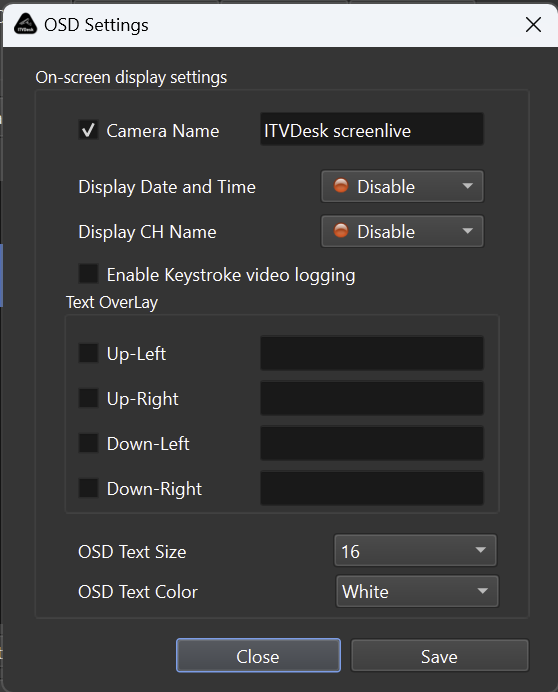
What Can Be Displayed
The following elements can be enabled or disabled individually:
-
Camera Name
Displays the logical camera name -
Date and Time
Shows current system date and time -
Channel Name (CH Name)
Displays the active channel identifier -
Keystroke Video Logging
Captures and overlays user keystrokes (used for auditing and training)
Custom Text Overlay
ITVDesk supports custom text overlays placed in predefined screen areas.
Available positions:
- Up-Left
- Up-Right
- Down-Left
- Down-Right
Each position can contain custom text, such as:
- Location identifiers
- Operator name
- POS terminal ID
- Transaction or system status
- Custom labels or warnings
Text Appearance Settings
You can control how OSD text looks on the video:
-
OSD Text Size
Controls font size -
OSD Text Color
Selectable color (e.g. white, yellow, etc.)
Text is rendered with high contrast to remain readable across different backgrounds.
Real-Time Behavior
- OSD changes are applied live
- No restart of ITVDesk is required
- OSD updates immediately affect:
- RTSP streams
- ONVIF streams
- Local recordings
This allows dynamic updates during operation.
Integration with Other Features
OSD Overlay works together with:
- Desktop Capture
- Webcam Capture
- External IP Cameras
- Combined Media Streams
- Recording (ONVIF Profile G)
OSD is embedded before encoding, ensuring consistent behavior across all clients.
Common Use Cases
- Surveillance camera identification
- POS transaction context
- Operator or workstation labeling
- Legal compliance (timestamp, camera ID)
- Training and audit recordings
- Remote monitoring and support
Summary
OSD Overlay in ITVDesk allows you to:
- Display system and custom text on video
- Control position, size, and color
- Apply changes in real time
- Embed text into live streams and recordings
This makes ITVDesk suitable for professional surveillance, POS environments, auditing, and enterprise video workflows.
Next Steps
👉 Motion Detection