Network Camera Test (NVR Readiness)
Overview
The Network Camera Test tool is a built-in diagnostic dialog that performs an end-to-end readiness check for a selected virtual IP camera.
It validates the most common reasons an NVR/VMS cannot connect reliably:
- Service binding issues (ONVIF / RTSP / RTSPS)
- Wrong bind IP address
- Missing or invalid credentials
- Missing main/sub stream profiles
- Port conflicts
- Real playback probe using FFplay
The result is shown as:
PASS(ready)WARN(ready with warnings)FAIL(not ready)
Best practice:
- Run this test right after adding a new camera in ITVDesk, and after any changes to IP/ports/credentials/stream profiles.
If you run only one tool during commissioning, make it Network Camera Test. It catches the most common integration issues early.
Where To Find It
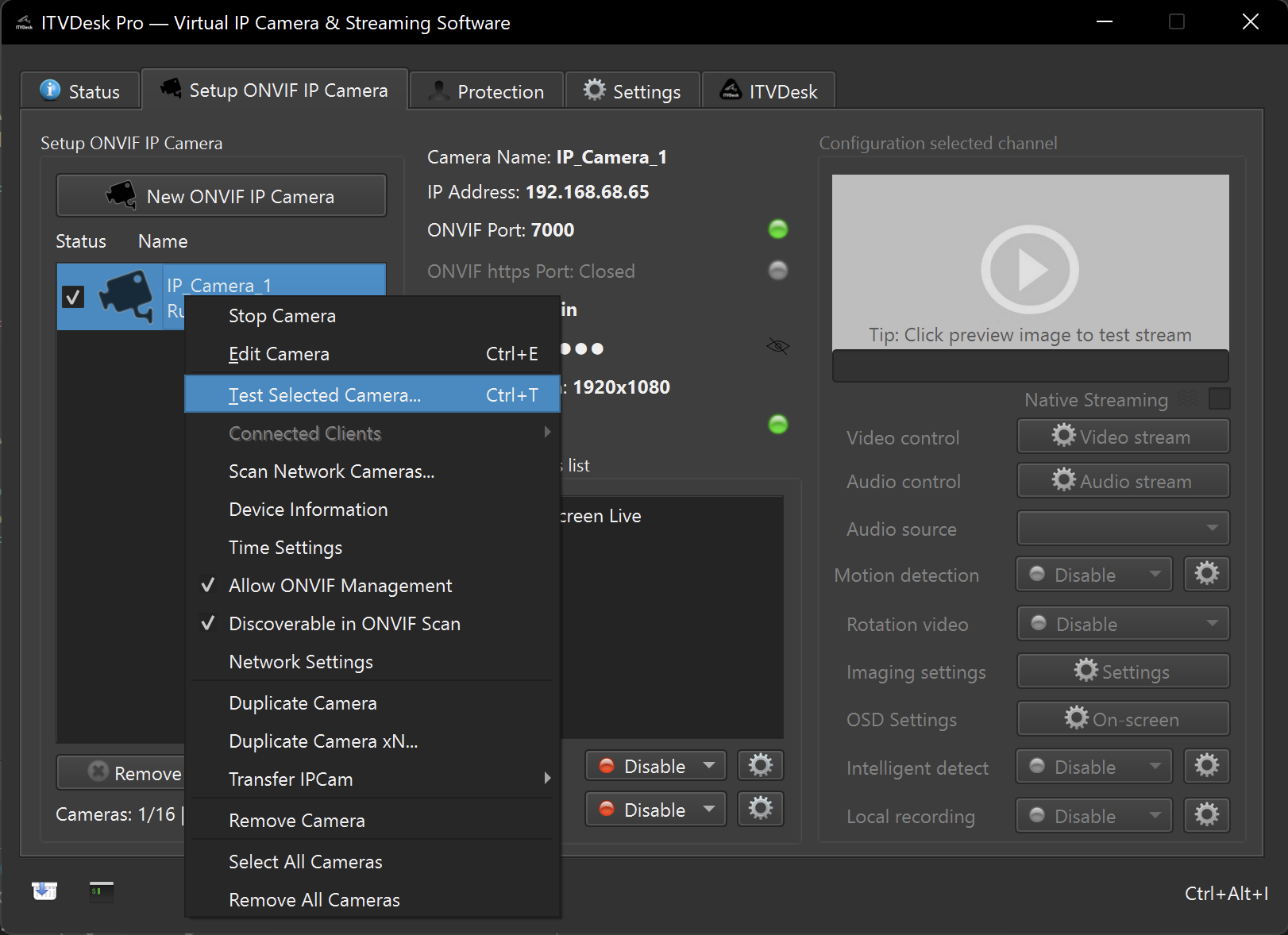
- Open the Front Application
- In the Camera List, right-click a camera
- Click
Test Selected Camera...
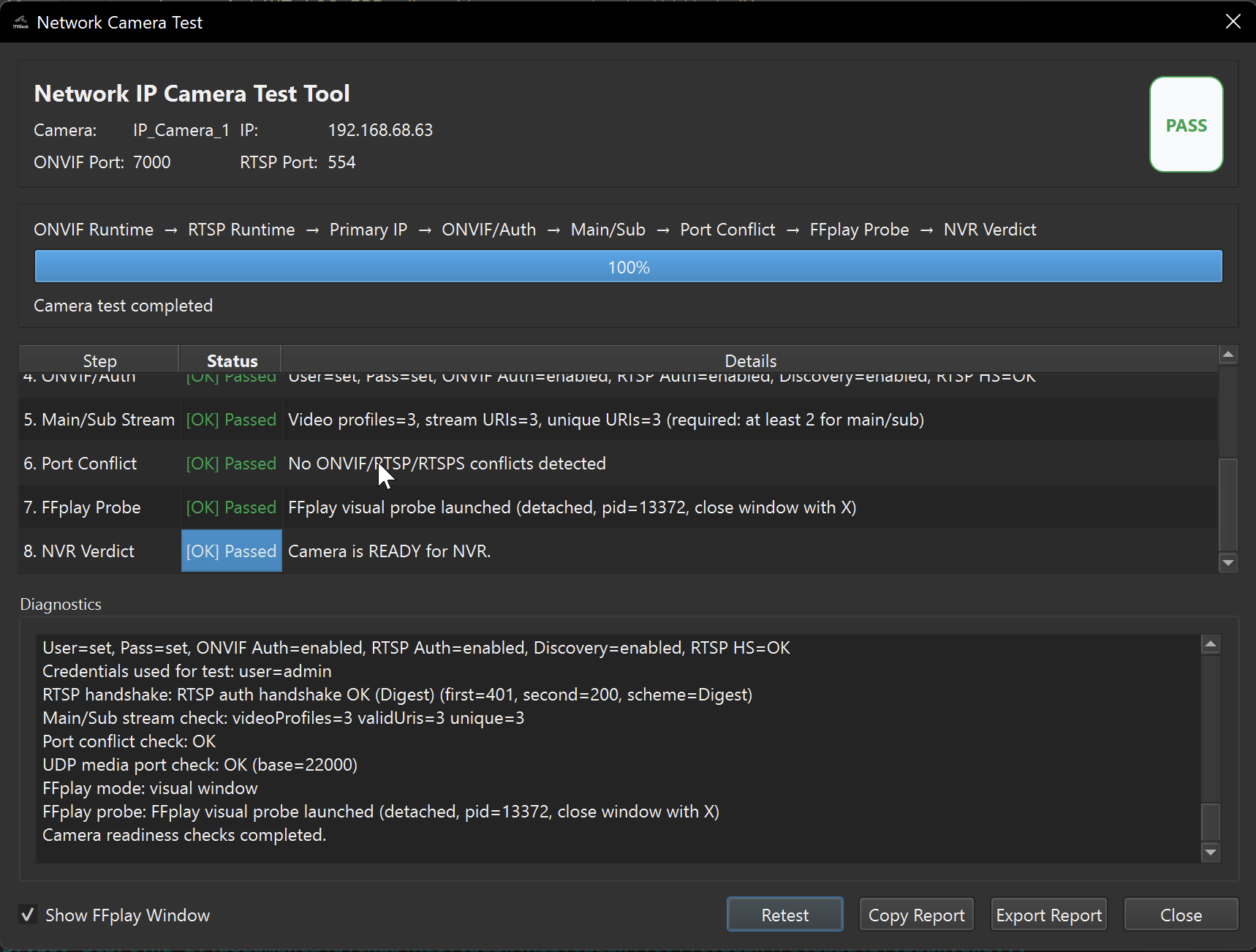
The dialog starts automatically and you can also run it again using Retest.
What The Test Does (8 Steps)
The tool runs these checks:
-
ONVIF Runtime Verifies ONVIF HTTP/HTTPS runtime status, bind state, and TCP reachability.
-
RTSP Runtime Verifies RTSP runtime, bind state on the camera IP, and TCP reachability. If RTSPS is enabled, it also checks RTSPS bind and reachability.
-
Primary IP Confirms the camera bind IP is a valid local interface. Warns if it is valid but not the primary host IP.
-
ONVIF/Auth Validates that credentials exist and performs an RTSP handshake (OPTIONS), including digest authentication when required. Warns if ONVIF discovery is disabled or firmware version is missing.
-
Main/Sub Stream Checks that the camera exposes at least 2 video profiles and at least 2 unique stream URIs (main + sub).
-
Port Conflict Detects conflicts between ONVIF HTTP/HTTPS, RTSP, RTSPS and RTSP-over-HTTP/HTTPS. Also warns about invalid/odd/conflicting UDP media base port.
-
FFplay Probe Runs a real playback probe against the RTSP stream:
- Visual mode (shows FFplay window)
- Headless mode (
-nodisp+ timeout)
-
NVR Verdict Produces the final verdict based on the previous steps.
Report (Copy / Export)
The dialog can generate a full report:
Copy Reportcopies the report to clipboardExport Reportsaves it to a.txtfile
The report includes:
- Camera name, IP, ports
- Overall verdict
- PASS/WARN/FAIL per step
- Detailed step messages + full diagnostics log
Common Fixes
If the test shows FAIL or WARN, typical fixes are:
- Primary IP warning/fail: bind the camera to the primary host IP or a valid local interface (avoid link-local and loopback).
- Auth fail: ensure at least one ONVIF user/password is configured.
- Main/Sub fail: enable/configure both main and sub stream profiles.
- Port conflict: change ONVIF / RTSP / RTSPS / HTTP(S) ports so they do not overlap.
- FFplay fail: verify RTSP URL and credentials; confirm RTSP is reachable from the same machine.