Audio Stream Settings
Overview
Audio Stream Settings define how ITVDesk encodes, exposes, and delivers audio streams together with video or as standalone audio channels.
Audio streaming is configured after an audio source is enabled in the main (front) application and is tightly integrated with:
- Video stream profiles
- RTSP and ONVIF services
- Two-way audio (audio back-channel)
- External audio sources
All audio settings can be applied in real time, without restarting ITVDesk.
Enabling Audio Streaming
To enable audio streaming:
- Open Setup ONVIF IP Camera
- Select the desired Virtual ONVIF IP Camera
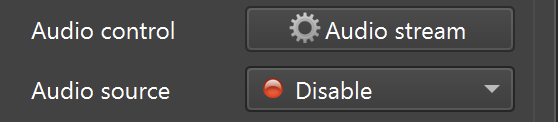
- In the front application, select and enable an Audio Source
- Open Audio Stream Settings
Once an audio source is enabled:
- Audio configuration becomes available
- RTSP stream URLs are updated automatically
- Two-way audio options can be enabled
Audio Stream Profiles
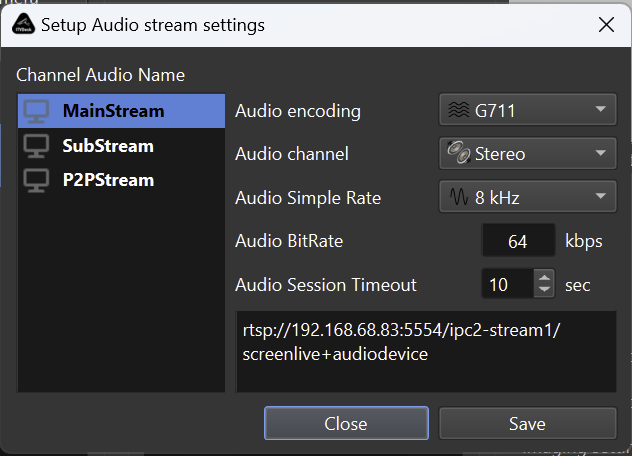
ITVDesk supports multiple audio profiles per camera, similar to video profiles.
Available profiles:
- MainStream – Primary audio stream
- SubStream – Secondary or low-bitrate audio
- P2PStream – Audio optimized for P2P or remote access
Each audio profile is configured independently.
Typical usage:
- MainStream for recording and monitoring
- SubStream for bandwidth-limited clients
- P2PStream for remote access
Audio Encoding Settings
Each audio stream profile supports the following parameters.
Audio Codec
Supported audio formats:
- G711 (A-law / μ-law)
- G722
- G726
- AAC
- OPUS
These codecs provide:
- Maximum compatibility with NVR/VMS systems
- High-quality voice transmission
- Low-latency and efficient compression
Audio Channel Mode
Defines the number of audio channels:
- Mono
- Stereo
Notes:
- G726 supports mono only
- Stereo is recommended for AAC and OPUS
Audio Sample Rate
Supported sample rates:
- 8000 Hz
- 11025 Hz
- 12000 Hz
- 16000 Hz
- 22050 Hz
- 24000 Hz
- 32000 Hz
- 44100 Hz
- 48000 Hz
Recommendations:
- Voice communication: 8000–16000 Hz
- High-quality audio: 44100–48000 Hz
Audio Bitrate
Defines the maximum audio bitrate (kbps).
Examples:
- G711: 64 kbps
- AAC: 64–128 kbps
- OPUS: adaptive
Higher bitrate improves quality but increases bandwidth usage.
Audio Session Timeout
Defines how long an inactive audio session remains open.
Purpose:
- Prevents unused audio sessions
- Reduces resource usage
Typical value:
- 10 seconds
RTSP Audio Stream URL
When audio is enabled, ITVDesk automatically modifies the RTSP stream URL.
Example:
rtsp://192.168.68.83:5554/ipc2-stream1/screenlive+audiodevice
RTSP Audio Stream Behavior
Embedded Audio Indicator
When audio is enabled, the RTSP stream URL is automatically extended.
Example behavior:
+audiodeviceindicates that audio is embedded into the stream- Audio is multiplexed together with video at the RTSP level
- The stream remains fully compatible with standard RTSP and ONVIF clients
Supported Clients
Audio-enabled RTSP streams can be accessed by:
- VMS systems
- NVR devices
- ONVIF-compatible clients
- RTSP players (VLC, FFplay, and similar tools)
Two-Way Audio (Audio Back-Channel)
ITVDesk supports bidirectional audio communication.
When two-way audio is enabled:
- Clients can send audio back to ITVDesk
- Audio is delivered to the selected output device
- The ONVIF audio back-channel is exposed to compatible clients
Supported Codecs for Two-Way Audio
- G711
- G722
- G726
- AAC
- OPUS
Typical Use Cases
- Intercom systems
- Operator communication
- Remote assistance
- POS and retail environments
Advanced Audio Behavior
- Audio encoding runs independently per stream profile
- Audio can be enabled or disabled without restarting ITVDesk
- Audio is synchronized with video at the RTSP level
- Audio works with:
- Screen Live
- Webcam Capture
- External IP Cameras
- Combined Media Streams
Performance Notes
- Audio encoding has minimal CPU impact
- OPUS and AAC provide the best quality-to-bitrate ratio
- Multiple audio profiles slightly increase resource usage
- Two-way audio requires compatible client support
Summary
Audio Stream Settings allow ITVDesk to operate as a professional IP camera with full audio support.
You can:
- Enable audio per stream profile
- Select modern or legacy audio codecs
- Control bitrate and sample rate
- Embed audio directly into RTSP streams
- Enable two-way audio communication
This makes ITVDesk suitable for surveillance, intercom systems, POS environments, and remote monitoring.