Connected Clients (Allow / Block / Reconnect)
Overview
Connected Clients is a camera context menu feature that shows a live list
of clients currently connected to a selected virtual IP camera over RTSP.
It is useful for:
- Quickly seeing who is streaming a camera right now
- Applying IP allow/block rules without leaving the camera list
- Forcing a client reconnect (disconnect current session)
Where To Find It
- Open the Front Application
- In the Camera List, right-click a camera
- Open
Connected Clients
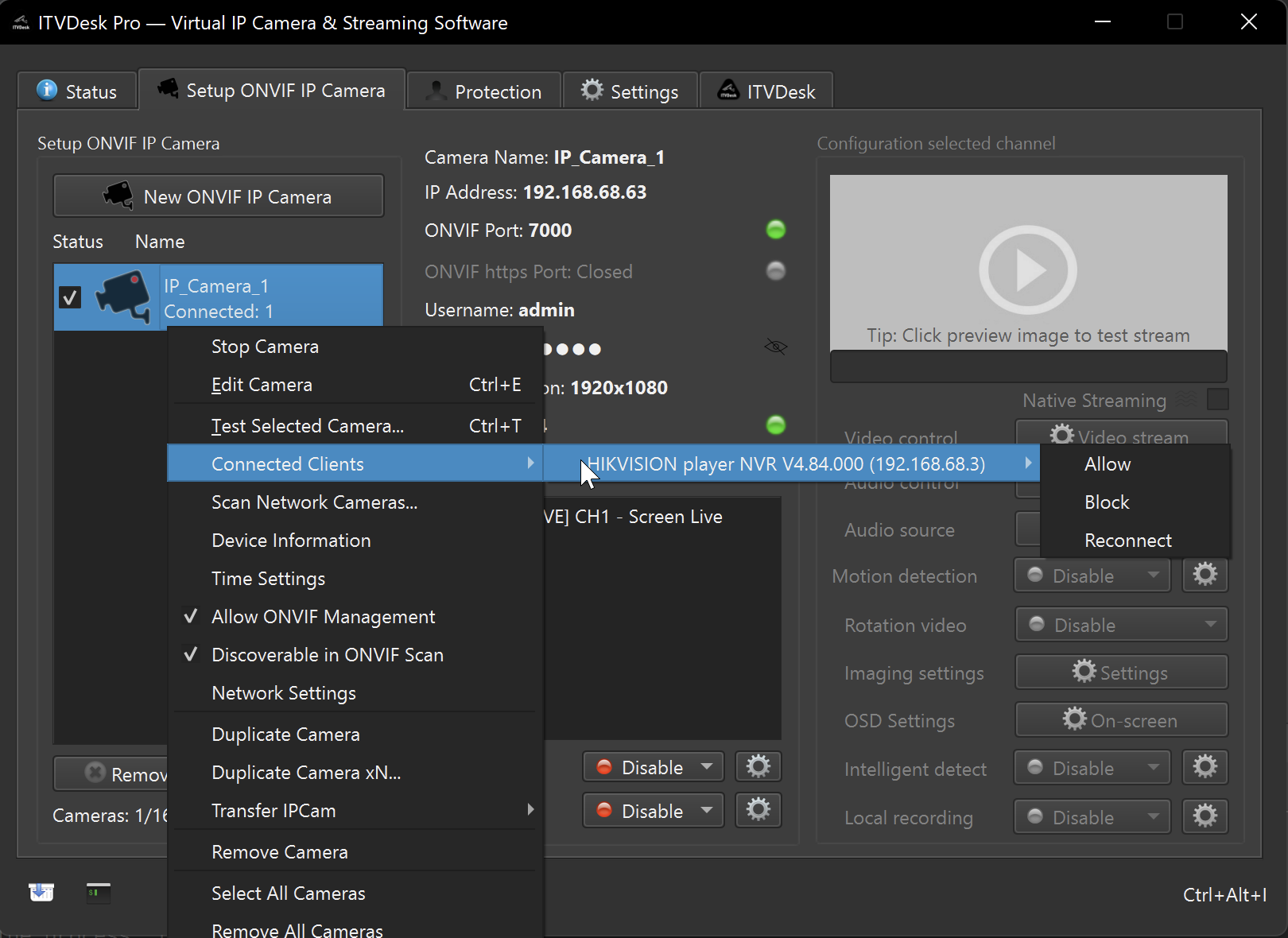
What You See
Each connected client is displayed as:
Client Name (IP)
Notes:
- If a client name is not available yet, ITVDesk shows
Unknown client. - The list is grouped by IP address (one entry per IP).
When It Is Enabled
Connected Clientsis enabled only when at least one client is currently connected to the selected camera.- If no clients are connected, the menu is disabled and shows
No connected clients.
Client Name Source
Client names are resolved from the same security audit / client access
events used by the Client Access UI.
Practical meaning:
- If the client recently authenticated and the name is present in the audit stream, it will be shown.
- If there is no audit entry (or the client did not provide a name), the menu
may fall back to
Unknown client.
Actions
Each client entry provides:
Allow
Applies an allow action for the client IP using the current IP Address Filter mode.
Details: Client Access & IP Address Filter
Block
Applies a block action for the client IP using the current IP Address Filter mode.
Details: Client Access & IP Address Filter
Reconnect
Reconnect forces the client to disconnect by closing the active RTSP session(s)
for that IP on the selected camera.
After disconnecting:
- The client may reconnect automatically (depending on the VMS/NVR/player).
Tips
- If you expect a client to appear but the menu is disabled, start playback in your VMS/NVR/RTSP player first.
- If the name is shown as
Unknown client, check theClient AccessUI to confirm whether the client name is being recorded.