Relay OUT (ONVIF Output / Local Action Trigger)
Overview
Relay OUT in ITVDesk represents an ONVIF-compatible output relay that can be triggered by external NVR/VMS systems or internal test actions.
Unlike Alarm IN (which sends events outward), Relay OUT receives commands and executes local actions on the computer where ITVDesk is running.
This allows ITVDesk to behave like a device with digital outputs.
How Relay OUT Works
Relay OUT exposes an ONVIF RelayOutput / Digital Output endpoint.
When an external system activates the relay:
- ITVDesk receives the ONVIF command
- The relay state changes according to configuration
- A configured local action is executed
Relay OUT can be used for automation, system control, and operator workflows.
Relay Output Configuration
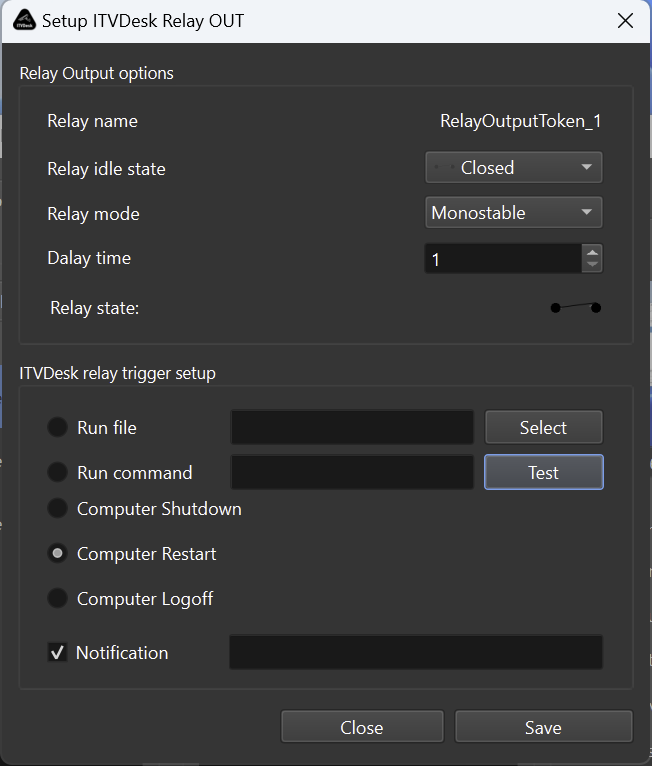
Relay Name
Defines the ONVIF relay output identifier.
Example:
RelayOutputToken_1
This name is visible to ONVIF clients and VMS/NVR systems.
Relay Idle State
Defines the default relay state when inactive.
- Open
- Closed
This determines the logical baseline state reported to ONVIF clients.
Relay Mode
Defines how the relay behaves when activated.
-
Monostable
Relay activates for a defined duration and then automatically returns to idle state. -
Bistable (if supported)
Relay toggles state and remains active until deactivated.
Delay Time
Defines how long the relay remains active (in seconds).
Typical values:
- 1–10 seconds
Used mainly in Monostable mode.
Relay State (Manual Test)
Allows manual toggling of the relay state for testing purposes.
Useful for verifying:
- ONVIF integration
- Local action execution
- Automation logic
ITVDesk Relay Trigger Actions
When the relay is activated, ITVDesk can execute one of the following local actions.
Run File
Executes a selected executable or script.
Examples:
- Start a local application
- Trigger automation scripts
- Launch external tools
Run Command
Executes a system command.
Examples:
- Batch scripts
- PowerShell commands
- Custom automation commands
Includes a Test button for immediate verification.
Computer Shutdown
Initiates system shutdown when relay is activated.
Use with caution.
Computer Restart
Restarts the computer upon relay activation.
Common in remote maintenance or recovery scenarios.
Computer Logoff
Logs off the currently active user session.
Notification
Displays a local notification when the relay is triggered.
Useful for operator feedback and debugging.
ONVIF Integration
Relay OUT is exposed via standard ONVIF Event and Device Services.
This allows external systems to:
- Activate relay outputs
- Control local actions remotely
- Integrate ITVDesk into alarm workflows
- Use ITVDesk as an automation endpoint
Typical Use Cases
Automation & Integration
- Run scripts from NVR alarm rules
- Trigger local automation from ONVIF events
- Integrate with third-party systems
Remote System Control
- Restart unattended systems
- Log off users remotely
- Controlled shutdown via VMS
Alarm Response Workflows
- Trigger local actions on alarm input
- Display notifications to operators
- Execute escalation scripts
Security Considerations
Relay OUT executes local system actions. Access should be restricted via ONVIF permissions and used only with trusted VMS/NVR systems.
Summary
Relay OUT in ITVDesk provides:
- ONVIF-compatible relay output interface
- Remote-triggered local system actions
- Flexible automation and control
- Seamless VMS/NVR integration
It enables ITVDesk to function not only as a video source, but also as a controllable ONVIF automation device.
Related Topics
👉