Motion Detection (ONVIF Events)
Overview
Motion Detection in ITVDesk is an event-based signaling mechanism used exclusively to notify external VMS/NVR systems to start or extend recording.
Motion Detection in ITVDesk does not trigger local recording on the computer. It is used only for sending ONVIF motion events to external systems.
The feature is designed primarily for desktop, application, and operator activity monitoring, where traditional video-based motion detection is not applicable.
Instead of analyzing image pixels, ITVDesk generates ONVIF motion events based on user interaction events, making it lightweight, reliable, and ideal for non-camera video sources.
How Motion Detection Works
ITVDesk monitors operating-system-level interaction events and converts them into ONVIF motion events.
Supported event sources include:
- POS Bill Trigger (Open / Close)
- Mouse click
- Mouse move
- Keyboard key press
When any enabled event occurs:
- A motion event is generated
- The event is exposed through ONVIF Event Services
- External VMS/NVR systems can react (start recording, extend recording, log events)
No local video files are created by this mechanism.
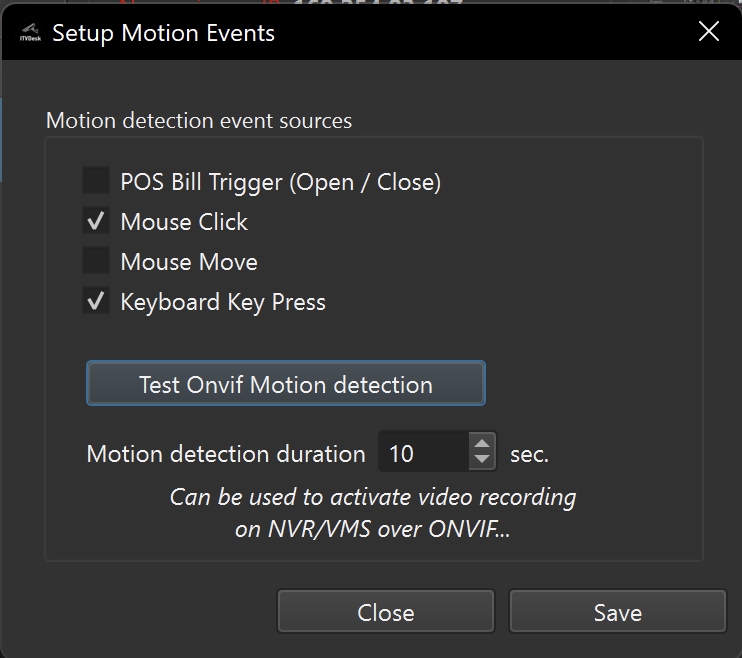
Motion Detection Event Sources
You can enable one or more motion event sources:
POS Bill Trigger (Open / Close)
Generates a motion event on POS Bill (Open / Close) activity.
Mouse Click
Generates a motion event on mouse button activity.
Mouse Move
Generates a motion event when cursor movement is detected.
Keyboard Key Press
Generates a motion event on any keyboard input.
Multiple sources can be active at the same time.
Motion Detection Duration
The Motion Detection Duration defines how long a motion event remains active after it is triggered.
- Configured in seconds
- Typical values: 5–30 seconds
- Each new interaction resets the timer
This allows external VMS/NVR systems to:
- Start recording
- Extend ongoing recordings
- Group multiple interactions into a single recording session
ONVIF Motion Events (External Recording Trigger)
Motion detection events are exposed using standard ONVIF Event Services and are intended solely for external consumption.
This allows:
- ONVIF clients to subscribe to motion events
- VMS/NVR systems to automatically trigger recording
- Motion markers to appear on external system timelines
The Test ONVIF Motion Detection button can be used to verify event delivery to connected ONVIF clients.
Recording Scope Clarification
- ✅ Triggers recording on external ONVIF-compatible VMS/NVR systems
- ❌ Does not control local recording on the ITVDesk computer
- ❌ Does not analyze video frames or pixel motion
Local recording features, if enabled, are controlled separately and are not affected by Motion Detection events.
Typical Use Cases
Desktop & Operator Monitoring
- Trigger recording only when user activity occurs
- Reduce storage usage on external NVRs
- Create meaningful audit trails
POS & Retail Environments
- Trigger NVR recording on cashier interaction
- Combine with POS overlay data
- Improve incident investigation
Training & Auditing
- Capture activity-based sessions on centralized VMS systems
- Review interaction-driven timelines
Performance Notes
- Negligible CPU usage
- No video analysis or frame processing
- Pure event-based signaling
- Ideal for:
- Screen Live sources
- Application windows
- Combined media streams
Summary
Motion Detection in ITVDesk is a pure ONVIF event generator designed to signal external VMS/NVR systems to record operator activity.
It provides:
- Interaction-based motion events
- ONVIF-compliant signaling
- Reliable external recording triggers
- Extremely low system overhead
Next Steps
👉