Alarm IN (Keyboard Trigger / ONVIF Event)
Overview
Alarm IN in ITVDesk is a manual alarm input mechanism used to send explicit alarm events to external NVR/VMS systems.
It allows the operator to trigger an alarm using a keyboard shortcut, which is then exposed as an ONVIF alarm input event.
Alarm IN is used only for signaling external systems and does not activate any local alarms or recording on the computer.
How Alarm IN Works
Alarm IN converts a user-defined keyboard key combination into an ONVIF alarm input event.
When the configured key combination is pressed:
- An alarm event is generated
- The event is sent via ONVIF
- External NVR/VMS systems can react immediately
This mechanism is ideal for intentional, operator-driven alarms.
Alarm Input Configuration
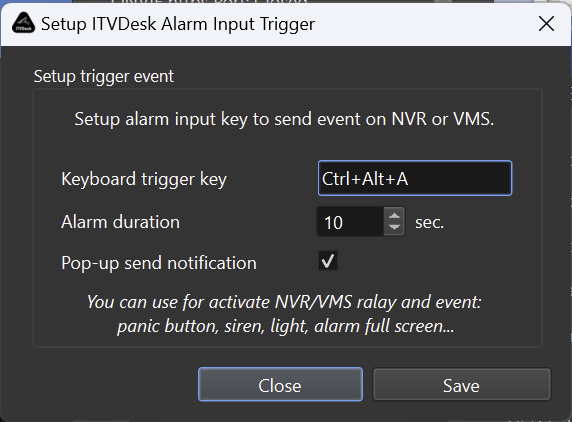
Keyboard Trigger Key
Defines the key combination used to activate the alarm.
Examples:
Ctrl + Alt + ACtrl + Shift + FAlt + F12
The shortcut works globally while ITVDesk is running.
Alarm Duration
Defines how long the alarm event remains active.
- Configured in seconds
- Typical values: 5–30 seconds
- After expiration, the alarm is automatically cleared
This duration is used by external systems to:
- Keep alarms active
- Control relay outputs
- Extend alarm-based recordings
Pop-up Send Notification
When enabled:
- A visual confirmation pop-up is shown
- Confirms that the alarm event was sent successfully
This helps operators avoid accidental or repeated triggers.
ONVIF Alarm Event (External Trigger)
Alarm IN events are exposed using standard ONVIF Event Services as alarm input / digital input events.
This allows external systems to:
- Trigger alarm rules
- Activate relays (siren, light, buzzer)
- Start or extend recording
- Log alarm events
- Switch to fullscreen or alarm layouts
Typical Use Cases
Panic Button
- Immediate alarm activation by operator
- Silent or visible alert to NVR/VMS
- Suitable for security desks and reception areas
POS & Retail Environments
- Manual alarm trigger during incidents
- Can activate sirens or warning lights
- Combine with POS overlay and video
Control Rooms & Monitoring
- Manual escalation of suspicious activity
- Clear operator intent (not motion-based)
- Reliable alarm signaling
Differences: Motion Detection vs Alarm IN
| Feature | Motion Detection | Alarm IN |
|---|---|---|
| Trigger type | Automatic (interaction-based) | Manual (keyboard) |
| Operator intent | Implicit | Explicit |
| Typical use | Recording trigger | Alarm / escalation |
| ONVIF event type | Motion event | Alarm input event |
| Local recording | ❌ No | ❌ No |
Notes & Limitations
- Alarm IN does not trigger local recording
- No local siren or sound is generated
- Alarm logic is fully handled by external VMS/NVR
- Requires ONVIF-compatible client support
Summary
Alarm IN in ITVDesk provides:
- Manual alarm triggering via keyboard
- ONVIF-compliant alarm input events
- Reliable signaling to external NVR/VMS systems
- Clear operator-controlled escalation
It is ideal for panic buttons, retail alarms, and control-room workflows where intentional alarm activation is required.
Next Steps
👉 Motion Detection (ONVIF Events)
👉 Recording Settings (External VMS/NVR)
👉 OSD Overlay Settings