Media From File
Overview
Media From File allows ITVDesk to stream local media files as a virtual ONVIF IP camera.
This feature enables video files, images, or audio files to be exposed as:
- ONVIF devices
- RTSP / RTSPS streams
- Inputs for Combined Media layouts
- Recordable sources inside VMS / NVR systems
It is commonly used for:
- Playback of recorded footage
- Test streams for VMS/NVR integration
- Demo and training environments
- Static image cameras
- Audio-only playback sources
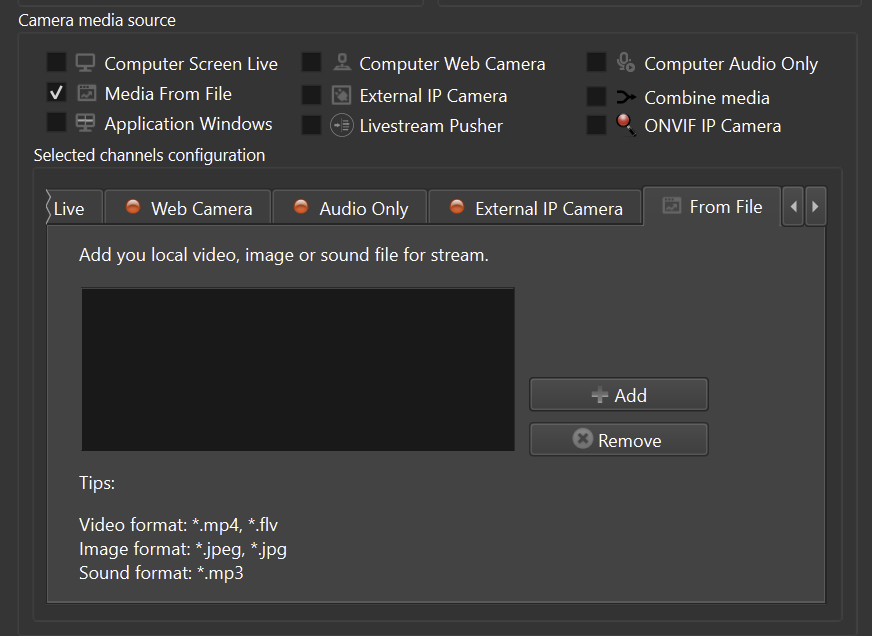
Supported Media Formats
ITVDesk supports the following file types:
Video
- MP4
- FLV
Images
- JPEG
- JPG
Audio
- MP3
Multiple files can be added and managed within a single virtual camera.
Selecting Media From File
To add media files as a source:
- Create a new Virtual ONVIF IP Camera
- In Camera Media Source, enable Media From File
- Click Add
- Select a local video, image, or audio file
- Confirm the selection
Each added file becomes a playable media source.
Automatic Transcoding
ITVDesk uses automatic transcoding to ensure maximum compatibility.
This means:
- Input media is decoded
- Stream is re-encoded on-the-fly
- Output is converted to the selected stream format and codec
Automatic transcoding allows:
- Resolution adjustment
- Codec conversion
- Bitrate control
- Audio mixing with other sources
- Seamless RTSP and ONVIF delivery
No manual conversion of files is required.
Playback Behavior
Depending on the media type:
- Video files are streamed as continuous video sources
- Image files are streamed as static video (virtual camera with still image)
- Audio files are streamed as audio-only ONVIF/RTSP sources
Playback behavior (looping, timing, stream parameters) is controlled through the main camera (front) settings after the camera is created.
Performance and Decoding
Media From File processing is optimized for stability and performance.
- GPU-accelerated decoding and encoding are used automatically when supported (for example H.264 / H.265 video files)
- CPU multi-threaded processing is used as a seamless fallback
If GPU acceleration is not available or supported, ITVDesk seamlessly falls back to optimized CPU processing without user intervention.
Integration with Other Media Sources
Media From File sources can be:
- Combined with desktop or webcam streams
- Used inside Combined Media layouts
- Mixed with live audio sources
- Recorded like any other IP camera stream
This allows file-based media to behave exactly like a real camera inside your VMS or NVR system.
Summary
Media From File allows ITVDesk to:
- Stream local video, image, or audio files
- Automatically transcode media for ONVIF and RTSP
- Use files as virtual IP cameras
- Combine file playback with live sources
- Provide reliable test and demo streams
This makes ITVDesk suitable not only for live capture, but also for media playback and simulation scenarios.
Next Steps
👉 Live Stream Pusher