Audio Only Stream
Overview
Audio Only Stream allows ITVDesk to create a stream that contains audio only, without any video data.
This mode is useful when only sound needs to be monitored, recorded, or distributed, without transmitting a video image.
ITVDesk exposes Audio Only streams as a virtual ONVIF IP device, providing audio access via RTSP and ONVIF where supported. VLC can be used for live playback.
Use Cases
Audio Only streaming is commonly used for:
- Microphone monitoring
- Intercom and audio surveillance
- Call center and operator audio recording
- POS and cashier audio capture
- Environmental sound monitoring
- Legal or compliance audio logging
Selecting Audio Only Source
To create an Audio Only stream:
- Create a new Virtual ONVIF IP Camera
- In Camera Media Source, enable Computer Audio Only
- Select the desired audio input device
- Confirm the configuration
Any audio input available on the system can be used, including:
- Microphones
- USB audio devices
- Line-in inputs
- Virtual audio devices
Each selected audio device becomes an independent audio stream.
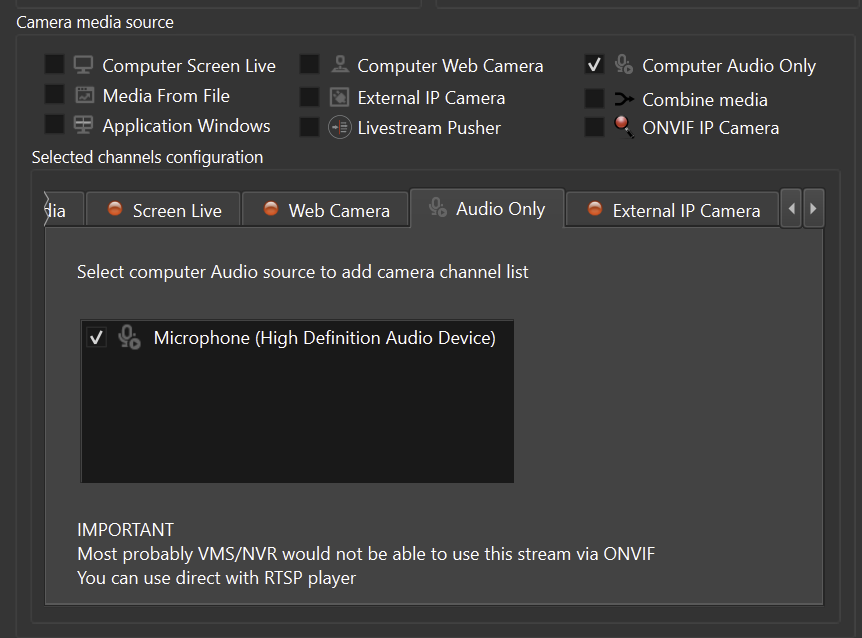
Supported Audio Devices
ITVDesk can stream audio from:
- Built-in microphone
- External USB microphones
- Professional audio interfaces
- Virtual audio drivers (if installed)
The selected device is used as the primary audio source for the stream.
ONVIF and VMS Compatibility
Audio Only streams are exposed as ONVIF-compatible devices, however:
Some NVR and VMS systems require a video stream and may not support audio-only ONVIF devices.
Because no video packets are present:
- Certain VMS/NVR systems may not display the device
- Some clients may reject the stream
- RTSP playback may fail in players that expect video
This behavior depends entirely on the capabilities of the receiving system.
Recommended Clients
Audio Only streams work best with:
- RTSP players that support audio-only streams
- VMS/NVR systems with explicit audio channel support
- ONVIF / RTSP clients that support audio-only streams
If your VMS does not support audio-only ONVIF devices, consider:
- Using Monitor Media Stream with a minimal video source
- Adding a low-resolution placeholder video source with
+audiodeviceenabled in the ITVDesk front application
Stream Settings
Audio stream parameters are configured after the camera is created, in the main (front) camera settings.
Typical audio settings include:
- Enable / disable audio stream
- Audio device selection
- Codec and bitrate (if applicable)
- Recording enable / disable
All changes are applied in real time, without restarting ITVDesk.
Advanced Audio Support
ITVDesk provides advanced audio processing and streaming capabilities, even when no video stream is present.
Supported audio codecs include:
- G.711 (A-law / μ-law)
- G.722
- G.726
- AAC
- OPUS
These codecs ensure compatibility with a wide range of:
- ONVIF clients
- VMS / NVR systems
- RTSP players
- Intercom and surveillance platforms
Two-Way Audio (Audio Back-Channel)
ITVDesk supports audio back-channel functionality where supported by the client and ONVIF profile.
This enables:
- Two-way audio communication
- Intercom-style usage
- Operator-to-device voice transmission
- Talk-back functionality from VMS or ONVIF client to the audio source
Audio back-channel support depends on:
- Selected audio codec
- ONVIF client capabilities
- VMS/NVR implementation
When supported, ITVDesk behaves like a full ONVIF audio device, not just a one-way audio stream.
Audio Mixing and Muxing
ITVDesk includes an internal audio mixer and muxer, allowing audio to be:
- Streamed as audio-only
- Mixed into any video media source
- Combined with desktop, webcam, or external camera streams
Audio routing and mixing are configured in the main (front) camera settings, not in the media source selection dialog.
This provides:
- Centralized audio control
- Consistent audio behavior across all media sources
- Flexible integration for complex setups
Summary
Audio Only Stream allows ITVDesk to:
- Stream audio without video
- Use any audio input device on the system
- Expose audio via ONVIF and RTSP
- Integrate audio monitoring into surveillance systems
This feature is ideal for environments where audio monitoring is required without visual content, while still leveraging ITVDesk’s ONVIF-based architecture.
Next Steps
👉 Media From File