Live Stream Pusher
Overview
Live Stream Pusher allows ITVDesk to operate as a full RTSP ingest server, meaning that external applications can push live audio/video streams directly into ITVDesk.
Once received, these streams can be:
- Exposed as standard RTSP streams
- Published as ONVIF-compatible virtual IP cameras
- Viewed, recorded, or forwarded to VMS / NVR systems
Unlike typical RTSP usage where a client pulls a stream, Livestream Pusher reverses the flow: the external source actively sends (pushes) the stream to ITVDesk.
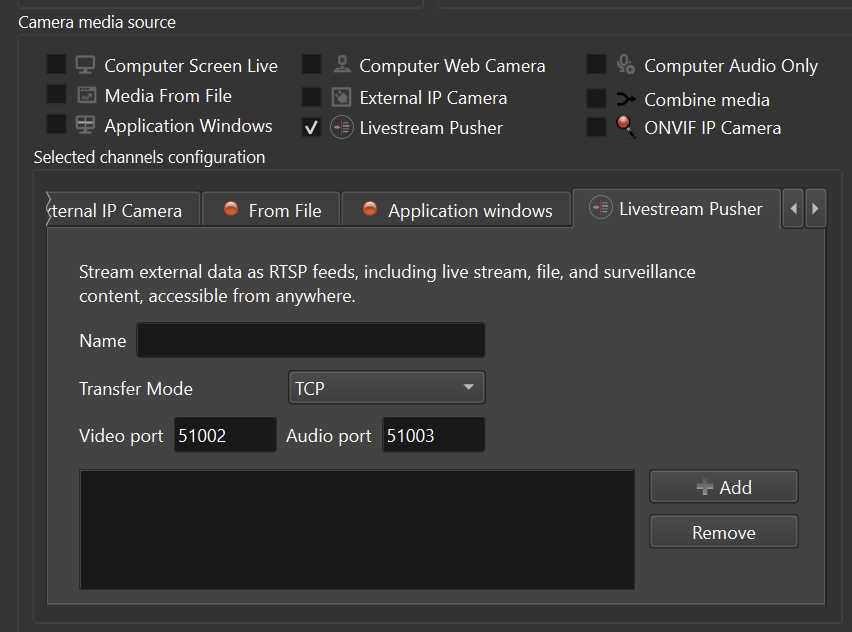
How Live Stream Pusher Works
In Live Stream Pusher mode, ITVDesk listens for incoming streams.
Data flow:
External Source
→ ITVDesk RTSP Server
→ VMS / NVR / RTSP Clients
This mode is ideal for:
- Dynamically generated streams
- External encoders or software
- Simulation, testing, or custom pipelines
- Environments where ITVDesk should act as a central ingest point
Enabling Live Stream Pusher
To enable Live Stream Pusher:
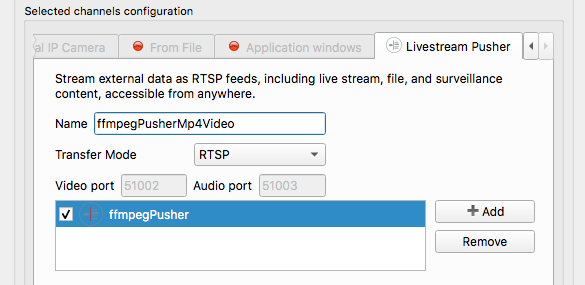
- Create a new Virtual ONVIF IP Camera
- In Camera Media Source, enable Livestream Pusher
- Configure:
- Stream name
- Transport mode (RTSP / TCP / UDP)
- Listening ports (RTSP / RTP)
- Click Add IP Camera
Once enabled, ITVDesk starts listening for incoming pushed streams.
Pushing Streams into ITVDesk (FFmpeg Example)
The most common way to push a stream into ITVDesk is using FFmpeg.
Example: Push a Video File as a Live RTSP Stream
ffmpeg -stream_loop -1 -re -i test.mp4
-vcodec libx264 -acodec copy
-f rtsp rtsp://192.168.68.100:5554/ipc1-stream1/livepusher1
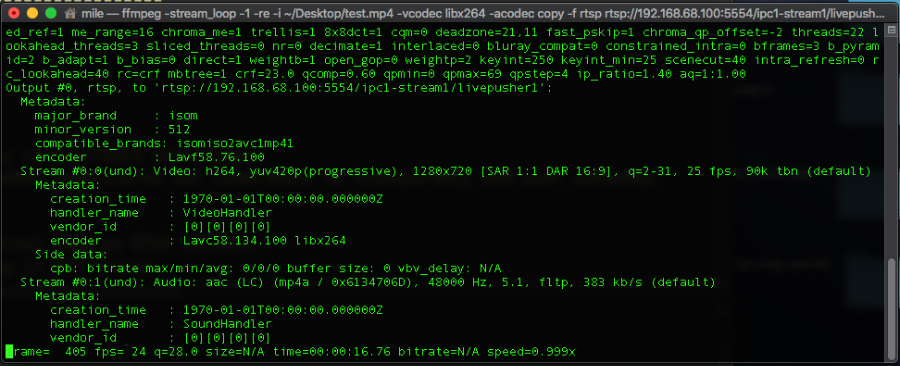
Explanation of Key Parameters
-stream_loop -1
Loops the input file endlessly.
Useful for continuous playback and testing scenarios.
-re
Sends data in real-time.
Important for live simulation and preventing buffer overflows.
-i test.mp4
Specifies the input media source (file, device, or stream).
-vcodec libx264
Encodes the video stream using the H.264 codec.
-acodec copy
Passes the audio stream without re-encoding.
-f rtsp
Sets the output format to RTSP.
rtsp://<ITVDESK_IP>:5554/<stream-name>
Target RTSP ingest URL on the ITVDesk server.
Once the stream is pushed, it becomes immediately available to connected clients.
Supported Transport Modes
Live Stream Pusher supports three transport modes:
RTSP Mode (Recommended)
- Works with FFmpeg and standard RTSP tools
- No special configuration required
- Any stream name can be used
- Best choice for most users
TCP Mode
- Reliable delivery
- Suitable for controlled or custom environments
- Used when stability is more important than latency
UDP Mode
- Lower latency
- Best-effort delivery
- Suitable for real-time or experimental streaming
Accessing the Pushed Stream
Once a stream is pushed into ITVDesk, it behaves like any other RTSP or ONVIF camera stream.
Clients can access the stream using:
Example: rtsp://192.168.68.100:5554/ipc1-stream1/livepusher1
Supported Clients
Once a stream is pushed into ITVDesk, it can be accessed by a wide range of standard video clients, including:
- VMS systems
- NVR devices
- ONVIF-compatible clients
- RTSP players (VLC, FFplay, and similar tools)
Practical Use Cases
Live Stream Pusher enables many real-world scenarios across different industries and environments.
Surveillance Integration
Push streams from:
- IP cameras
- Hardware encoders
- Existing NVR systems
Education and Training
- Stream lectures and presentations
- Demonstrate software or workflows
- Replay recorded training materials
Live Events
- Conferences
- Concerts
- Sports events
- Internal company broadcasts
Media Distribution
- Internal video distribution within organizations
- Controlled access to live or recorded streams
Testing and Simulation
- Generate synthetic RTSP streams
- Development and QA testing
- VMS / NVR validation environments
Custom Pipelines
- Integrate FFmpeg-based workflows
- Use GStreamer pipelines
- Connect OBS Studio or proprietary encoders
Supported External Tools
Live Stream Pusher works with any tool capable of pushing RTSP streams, including:
- FFmpeg
- GStreamer
- VLC Media Player
- OBS Studio
- Live555
- Custom or embedded encoders
Technical Note – TCP Mode
When using RTP over TCP, each RTP packet includes an additional 4-byte header:
0x24– RTP-over-TCP marker- Channel identifier
- Payload length (including RTP header)
This mechanism is required for correct RTP multiplexing over a single TCP connection.
Summary
Live Stream Pusher allows ITVDesk to:
- Act as a full RTSP ingest server
- Receive pushed audio and video streams
- Convert pushed streams into ONVIF-compatible IP cameras
- Integrate external encoders and streaming tools
- Support RTSP, TCP, and UDP transport modes
This makes ITVDesk not only a capture application, but a flexible RTSP and ONVIF gateway suitable for advanced and enterprise streaming workflows.