Advanced Settings
Overview
The Advanced Settings section contains low-level, system-critical configuration options intended for system integrators, administrators, and advanced users.
⚠️ Warning
Incorrect configuration in this section may affect:
- Network video connectivity
- Security
- ONVIF / RTSP compatibility
- Connection stability
Most standard deployments do not require changes in this section.
RTSP / Streaming Service (Advanced)
Change RTSP Server Port
Defines the primary RTSP listening port.
- Default:
5554 - Change only if:
- Port conflict exists
- Multiple RTSP servers run on the same host
Requires restart or Apply Changes.
ITVDesk uses RTSP port 5554 by default instead of the standard 554.
This avoids conflicts with other IP cameras, NVRs, or RTSP services commonly found on the same network.
Default RTSPS (TLS Encrypted RTSP)
Defines the RTSPS (encrypted RTSP) port.
- Used for secure RTSP communication
- Requires RTSPS-capable clients
Recommended for production environments.
See also: RTSPS (Secure RTSP)
Disable RTSP Authentication
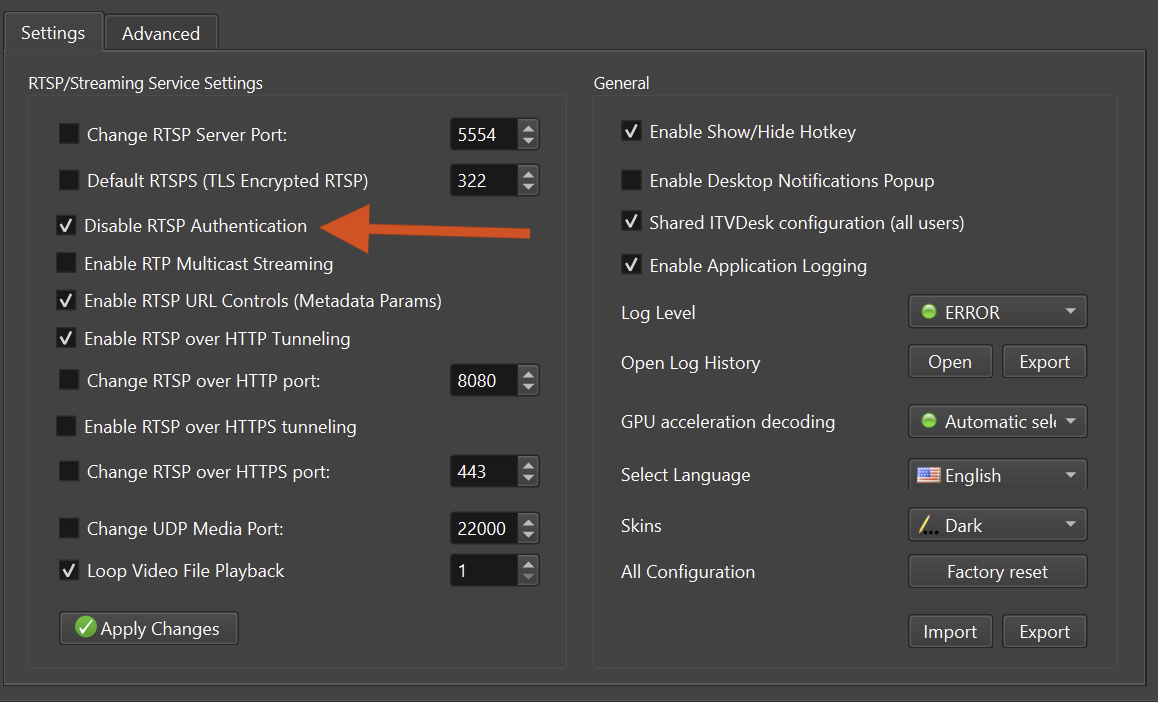
When enabled:
- RTSP streams are accessible without credentials
⚠️ Security Risk
Use only in:
- Isolated networks
- Testing environments
Not recommended for internet-exposed systems.
Enable RTP Multicast Streaming
Enables multicast RTP delivery.
Used when:
- Multiple clients consume the same stream
- Network infrastructure supports multicast
⚠️ Requires correct switch and router configuration.
See also: RTP Multicast Streaming
Enable RTSP URL Controls (Metadata Params)
Allows RTSP URLs to include control parameters.
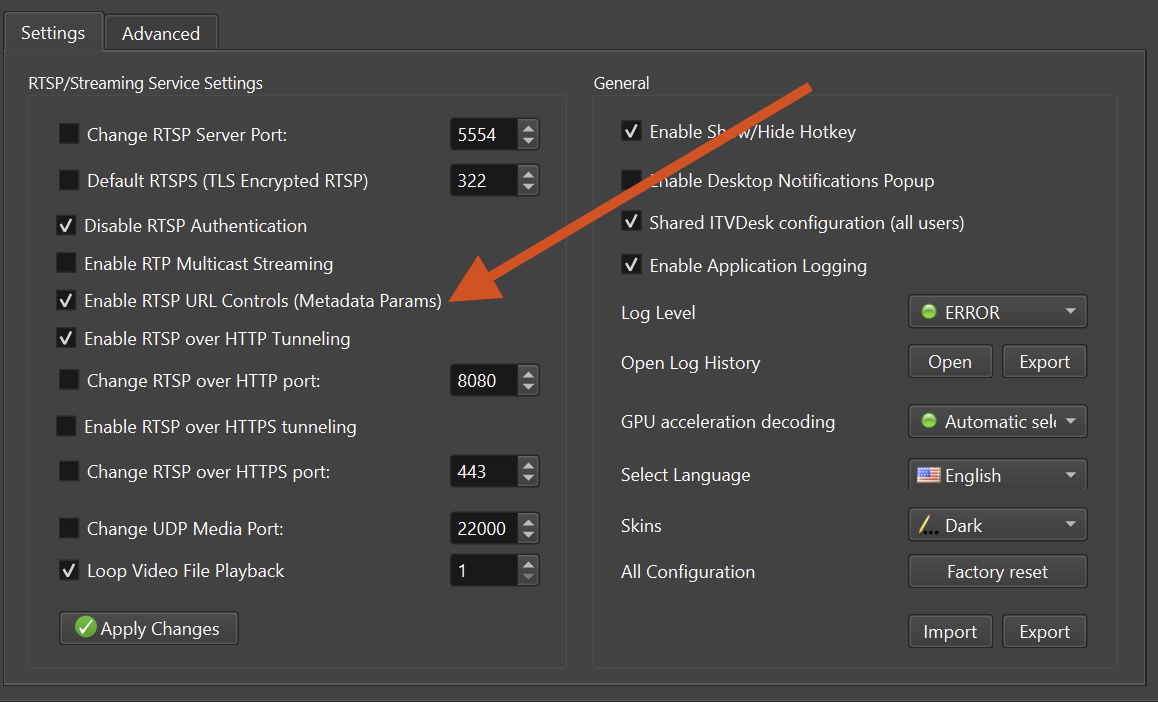
Used for:
- Advanced integrations
- Dynamic metadata-driven behavior
Typically used by custom clients.
rtsp://192.168.68.83:5554/ipc2-stream1/screenlive+audiodevice ?t=unicast&p=udp &ve=h264&w=1920&h=1080&fps=30&vb=4000 &ae=aac&sr=44100&ch=2
See also: Metadata Params Streaming
RTSP over HTTP / HTTPS Tunneling
Allows RTSP traffic to be tunneled over:
- HTTP
- HTTPS
Used when:
- RTSP ports are blocked
- Firewall traversal is required
Custom ports can be defined for both modes.
See also: RTSP over HTTP / HTTPS (Media Transport)
Change UDP Media Port
Defines the UDP port used for RTP media transport.
UDP 22000–30000 – RTSP media transport
RTSP streaming uses multiple internal media channels (video, audio, control, and optional metadata). Depending on enabled features and the number of connected clients, a single RTSP connection may temporarily use several UDP ports from the media range. This is normal behavior and ensures stable, high-quality streaming.
If you encounter the error “Bind UDP socket fail, error = WSAE-10013”, this usually indicates a port conflict or insufficient permissions.
Ensure:
- Port is open in firewall
- No conflict with other services
🔁 Loop Video File Playback
Defines how many times a video file media source (e.g. MP4) will be replayed.
Values:
-1→ Infinite loop (continuous playback)0→ Play onceN→ Replay exactly N times
When enabled:
- The video file automatically restarts after reaching the end
Recommended use cases:
- Demo environments
- Media pipeline testing (RTSP / ONVIF / recording)
- Offline simulations and virtual camera sources
Set the value to -1 when using a video file as a persistent virtual camera
to ensure uninterrupted streaming.
Platform Access – ITVDesk Connect (Advanced)
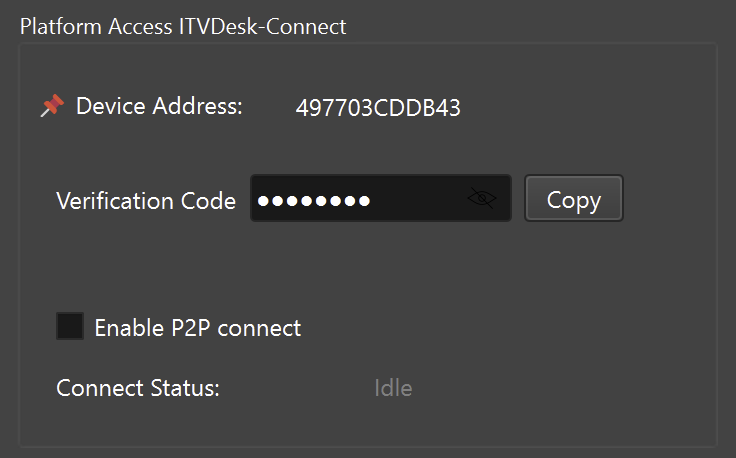
Device Address
Unique identifier for the ITVDesk instance.
Used for:
- Platform pairing
- Remote identification
Verification Code
Secure pairing credential.
- Must be kept confidential
- Used during connection setup
Enable P2P Connect
Enables peer-to-peer connectivity for supported remote-access workflows.
Used for:
- NAT traversal
- Remote access scenarios
- Cloud-assisted connectivity
⚠️ Requires outbound internet access.
Connect Status
Displays current platform connection state.
Watcher Manager (System Control)
Controls internal monitoring and recovery mechanisms.
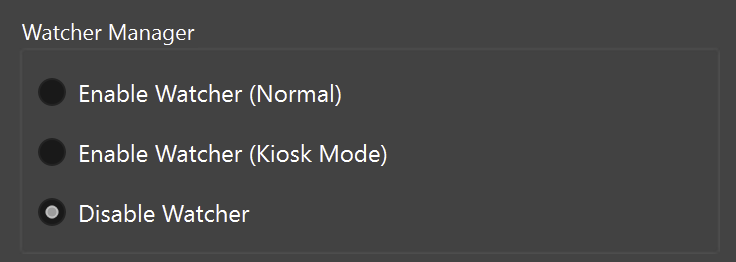
See also: Watcher Manager (System Monitoring & Recovery)
Enable Watcher (Normal)
Monitors:
- Application health
- Runtime responsiveness
Automatically recovers from common failure states.
Enable Watcher (Kiosk Mode)
What it does:
- Automatically restarts ITVDesk even if manually closed
- Prevents accidental or intentional shutdown
- Ensures the application is always running
- Provides maximum uptime and recovery
Used in:
- Public displays
- Dedicated monitoring stations
Disable Watcher
Disables all monitoring features.
⚠️ Not recommended for unattended systems.
Enable Auto Maintenance
Allows scheduled maintenance operations.
Examples:
- Restart
- Cleanup
- Resource reset
Maintenance Time
Defines when maintenance tasks are executed.
Best practice:
- Off-hours
- Low-usage periods
Bidirectional Audio (ONVIF Audio Backchannel)
Enable Bidirectional Audio
Enables ONVIF audio backchannel support.
Allows:
- Audio playback from VMS to ITVDesk
See also: Audio Backchannel (ONVIF / RTSP)
Samplerate
Defines audio sampling rate.
Common values:
8000 Hz(telephony / G.711)16000 Hz(higher quality)
Audio Codec
Defines audio encoding format.
Example:
- G.711A
Must be supported by the ONVIF client.
Channels Type
Defines audio channel layout.
- Mono (recommended)
- Stereo (if supported)
Performance & Stability Notes
- Advanced streaming options may increase GPU/CPU and network usage
- ITVDesk uses GPU acceleration when available, with automatic CPU fallback
- Multicast and tunneling require proper network configuration
- P2P connectivity depends on external network conditions
- Watcher is recommended for unattended or 24/7 systems
Best Practices
- Change one advanced setting at a time
- Test using ONVIF Device Manager or another compatible ONVIF client
- Backup configuration before major changes
- Use encrypted protocols in production
- Avoid disabling authentication unless necessary
Summary
Advanced Settings provide control over:
- Low-level streaming behavior
- Network and security configuration
- Platform connectivity
- System monitoring and recovery
- ONVIF audio backchannel support
These options enable ITVDesk to be deployed in complex, enterprise, and restricted environments when configured by experienced administrators.
Related Topics
👉 Settings
👉 Preview & Test
👉 Troubleshooting
👉 Security & Best Practices