Media Server URL Parameters
Overview
The ITVDesk media server supports dynamic stream configuration using RTSP URL query parameters.
This mechanism allows video, audio, and transport settings to be customized per RTSP request, without modifying device or server configuration files.
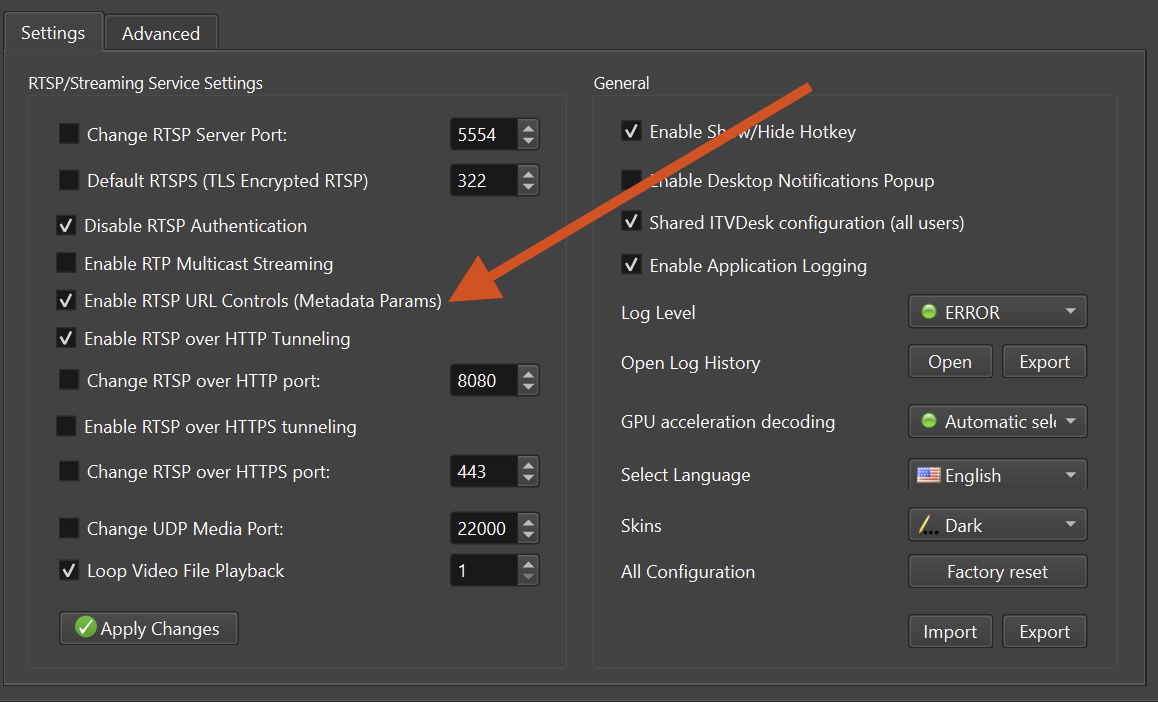
Parameters specified in the RTSP URL have higher priority than settings defined in:
- Device configuration
- Media source defaults
- Server configuration files This enables real-time, per-client customization.
RTSP URL Format (ITVDesk)
ITVDesk uses a custom RTSP stream path format. Dynamic parameters are appended using a standard query string.
General Format
rtsp://[serverip]:[serverport]/[ipc-stream]/[media-source]?param=value
Example (ITVDesk)
rtsp://192.168.68.83:5554/ipc2-stream1/screenlive+audiodevice
The stream can be dynamically configured by appending URL parameters.
Dynamic Configuration with URL Parameters
URL parameters allow on-the-fly override of stream properties.
- No restart required
- No configuration file changes
- Different clients can request different stream settings
- Parameters apply per RTSP request
Parameter Categories
Unless otherwise specified, parameters apply to the requested stream only.
Video Parameters
| Parameter | Example | Description |
|---|---|---|
ve | h264, h265, jpeg, mp4 | Video encoding format |
w | 1920 | Video width (pixels) |
h | 1080 | Video height (pixels) |
fps | 30 | Video frame rate (frames per second) |
vb | 4000 | Video bitrate (kbps) |
Audio Parameters
| Parameter | Example | Description |
|---|---|---|
ae | pcmu, pcma, g726, g722, opus, aac | Audio encoding |
sr | 44100 | Audio sample rate (Hz) |
ch | 1, 2 | Audio channels (mono / stereo) |
ab | 128 | Audio bitrate (kbps) |
Transport Parameters (RTSP)
| Parameter | Example | Description |
|---|---|---|
t | unicast, multicast | Transmission mode |
p | udp, tcp | RTP transport protocol |
srtp | 0, 1 | Enable SRTP encryption |
SRTP for Playback
ITVDesk RTSP server supports SRTP encryption for playback streams
using the srtp URL parameter.
This option controls whether recorded media playback is transmitted using Secure RTP (SRTP) instead of plain RTP.
SRTP for playback encrypts the RTP media stream during transmission. It does not encrypt media files stored on disk.
URL Parameter
| Parameter | Values | Description |
|---|---|---|
srtp | 0, 1 | Enable (1) or disable (0) SRTP encryption |
Example: Enable SRTP for Playback
Enable SRTP when playing a recorded media file:
rtsp://192.168.68.83:5554/ipc2-stream1/test.mp4?srtp=1
In this case:
- RTSP signaling remains unchanged
- RTP media packets are encrypted using SRTP
- The client must support SRTP playback
Testing SRTP Playback
SRTP playback can be tested using:
- FFplay
- ITVDesk “From File” media source
- Any RTSP client with SRTP support
Example using FFplay:
ffplay rtsp://192.168.68.83:5554/ipc2-stream1/test.mp4?srtp=1
Live Stream vs Playback (SRTP)
| Feature | Live Stream | Playback |
|---|---|---|
| Uses RTSP | ✅ | ✅ |
| Uses RTP | ✅ | ✅ |
| Supports SRTP | ✅ | ✅ |
Controlled by srtp parameter | ✅ | ✅ |
| Encrypts stored files | ❌ | ❌ |
When to Use SRTP for Playback
Recommended for:
- Remote playback over untrusted networks
- Enterprise and compliance environments
- Secure access to recorded video
- ONVIF Profile G playback sessions
SRTP Support in ONVIF Services
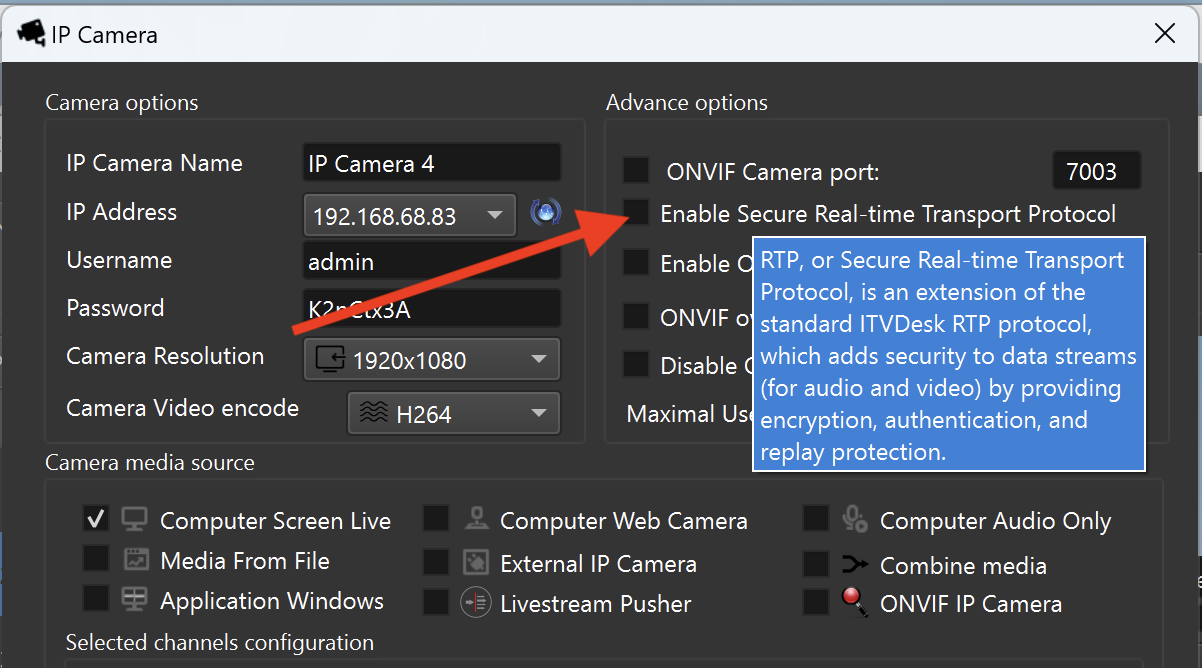
In addition to RTSP-based streaming, ITVDesk ONVIF services also support SRTP for media transmission.
This means that when an ONVIF client connects to ITVDesk:
- ONVIF signaling is used for session control
- Media streams are delivered over RTP
- SRTP can be enabled to encrypt ONVIF media streams
SRTP support applies to:
- Live video streams
- Playback streams (ONVIF Profile G)
- ONVIF event-driven media sessions
Relationship Between ONVIF and RTSP SRTP
ONVIF uses RTSP as the underlying media transport mechanism. As a result:
- The
srtpparameter controls encryption at the RTP media layer - The same SRTP mechanism is used for:
- Direct RTSP access
- ONVIF client sessions
This ensures consistent security behavior across:
- RTSP clients
- ONVIF-compatible VMS/NVR systems
Security Notes
- SRTP encrypts media in transit, not stored files
- ONVIF clients must support SRTP to receive encrypted streams
- For maximum security, use:
- RTSPS (RTSP over TLS) for signaling
- SRTP for media encryption
This combination provides full end-to-end protection for both ONVIF and RTSP-based streaming.
Notes
- SRTP requires client-side support
- Enabling SRTP increases CPU usage
- For maximum security, combine RTSPS + SRTP
Practical Examples
Example 1: High-Quality Desktop + Audio Stream
H.264 video, 1080p, 30fps, 4 Mbps, AAC audio, unicast RTP over UDP.
rtsp://192.168.68.83:5554/ipc2-stream1/screenlive+audiodevice ?t=unicast&p=udp &ve=h264&w=1920&h=1080&fps=30&vb=4000 &ae=aac&sr=44100&ch=2
Example 2: Low-Bandwidth Firewall-Friendly Stream
H.265 video, 720p, 15fps, RTP over TCP, OPUS audio.
rtsp://192.168.68.83:5554/ipc2-stream1/screenlive+audiodevice ?t=unicast&p=tcp &ve=h265&w=1280&h=720&fps=15&vb=1000 &ae=opus
Example 3: Secure Multicast Stream
Multicast RTP with SRTP encryption enabled.
rtsp://239.1.1.1:5554/ipc2-stream1/screenlive+audiodevice ?t=multicast&p=udp&srtp=1
Best Practices & Tips
- Parameter order does not matter
- Use logical ordering for readability
- URL-encode special characters if required
- Higher resolution, frame rate, and bitrate increase CPU and bandwidth usage
- Use
p=tcpwhen UDP is blocked by firewalls - Enable
srtp=1for encrypted or sensitive environments - Prefer H.264 + AAC for maximum VMS compatibility
Typical Use Cases
- Per-client stream optimization
- Low-bandwidth remote access
- Firewall-friendly RTSP streaming
- Secure encrypted streams
- Testing and development
- Dynamic VMS profile simulation
Summary
Media Server URL Parameters in ITVDesk provide a powerful mechanism to:
- Override static configuration
- Customize streams per request
- Optimize performance per client
- Secure live and playback streams
This feature is intended for integrators, developers, and advanced users.
Related Topics
👉 Advanced Settings
👉 Preview & Test
👉 ONVIF Profiles & Streaming
👉 Troubleshooting