Shared ITVDesk Configuration (All Users)
Overview
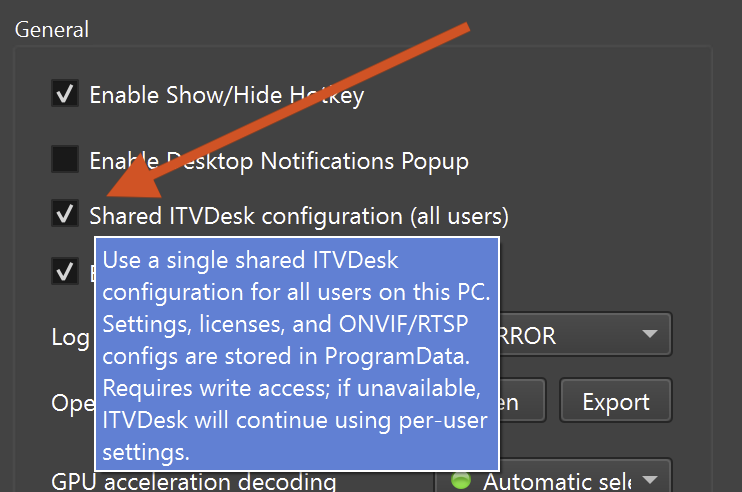
The Shared ITVDesk Configuration option allows multiple users on the same computer to use one common ITVDesk configuration instead of separate per-user setups.
When enabled, all users share:
- Application settings
- Licenses and activation state
- ONVIF configuration
- RTSP streaming settings
- Media sources and profiles
This eliminates the need to configure ITVDesk separately for each user account and is ideal for environments where consistency is required.
Administrator Mode Requirement
Enabling Shared Configuration
When enabling Shared ITVDesk Configuration, it is strongly recommended to start ITVDesk in Administrator mode.
This is required because:
- Auto-startup settings are applied for all users on the computer
- Writing shared configuration data requires system-level permissions
Without administrator privileges:
- Startup options may not be applied correctly
- Shared configuration may not be fully activated
Disabling Shared Configuration
When Shared Configuration is enabled and you want to disable it later:
- ITVDesk must also be started in Administrator mode
- Without admin rights, the application will not be able to disable system-wide startup or shared configuration
This behavior prevents inconsistent system state and permission issues.
Enable or disable shared configuration only with Administrator permissions.
Configuration Storage Locations
Shared Configuration (Enabled)
When shared configuration is enabled, all data is stored centrally in:
C:\ProgramData\ITVDesk
This includes:
- Configuration files
- Licenses
- ONVIF and RTSP settings
- Runtime data
All users on the PC access the same configuration.
Per-User Configuration (Disabled)
When shared configuration is disabled:
- ITVDesk switches back to per-user configuration
- Each user has an independent setup
- Data is stored in the user's roaming profile:
C:\Users\<username>\AppData\Roaming\ITVDesk
In this mode:
- Each user can configure ITVDesk independently
- Changes made by one user do not affect others
Per-User vs Shared Configuration
| Feature | Per-User Mode | Shared Mode |
|---|---|---|
| Settings | Per user | Shared |
| Licenses | Per user | Shared |
| ONVIF / RTSP config | Per user | Shared |
| Media sources | Per user | Shared |
| Requires admin rights | ❌ No | ✅ Yes |
| Multi-user consistency | ❌ No | ✅ Yes |
Typical Use Cases
🧪 Computer Labs & Test Environments
- Central control of all users
- Easy switching between shared and individual configurations
- Ideal for lab testing and validation
🏢 Enterprise & Administration
- Unified configuration across all user accounts
- Reduced maintenance and setup time
- Centralized license management
🖥️ Shared Workstations
- Control rooms
- Monitoring stations
- Operator or kiosk systems
When to Use This Option
Enable shared configuration when:
- You want to control all users on the computer
- A single configuration must apply system-wide
- Startup behavior should be identical for all users
- Managing lab or enterprise machines
Disable shared configuration when:
- Each user requires independent settings
- User configurations must be isolated
- Per-user flexibility is more important than central control
Summary
Shared ITVDesk Configuration provides:
- Centralized configuration management
- System-wide startup control
- Simplified administration
- Clear separation between shared and per-user modes
This option is recommended for labs, enterprise systems, administrative workstations, and shared PCs.