Settings
Overview
The Settings section contains general and safe configuration options intended for everyday use by operators and administrators.
These settings affect:
- User experience
- Application behavior
- Logging and diagnostics
- Configuration management
They do not modify low-level networking, security, or streaming internals.
For system-level configuration, see 👉 Advanced Settings.
User Interface & Experience
Enable Show / Hide Hotkey
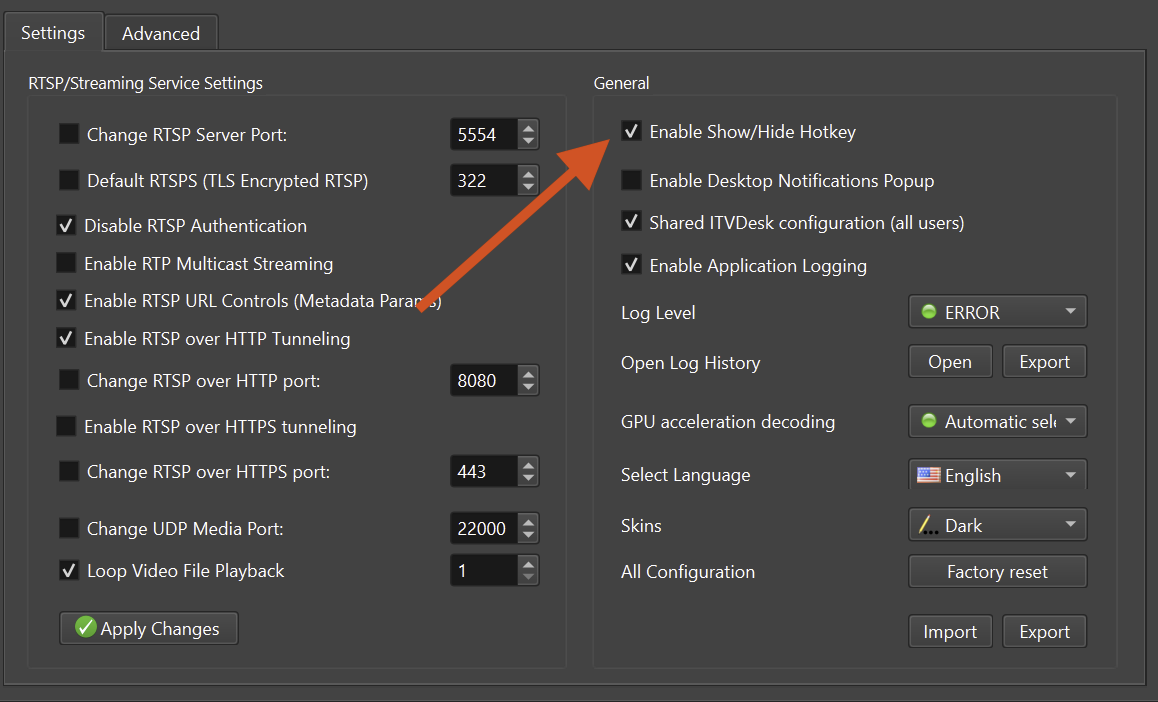
Allows showing or hiding the ITVDesk window using a keyboard shortcut.
Useful for:
- Background operation
- Quick access during monitoring
Enable Desktop Notifications Popup
Displays system notifications for important events and actions.
Recommended for operator feedback.
Select Language
Defines the application UI language.
Changes apply immediately or after restart.
Skins
Controls the application visual theme.
Examples:
- Dark
- Light
Logging & Diagnostics
Enable Application Logging
Enables internal application logging.
Keep logging enabled for diagnostics and support.
Log Level
Controls log verbosity.
Typical usage:
- ERROR – production environments
- INFO – normal operation
- DEBUG – troubleshooting
DEBUG log levels may generate larger log files.
Open Log History
Allows:
- Viewing log files
- Exporting logs for support or analysis
Configuration Management
Shared ITVDesk Configuration (All Users)
When enabled:
- Configuration is shared across all system users
- Suitable for multi-user or service-like deployments
When disabled:
- Each user maintains a separate configuration
See also: Shared ITVDesk Configuration (All Users)
Import Configuration
Imports a previously exported configuration file.
Useful for:
- System migration
- Backup restore
- Mass deployment
Export Configuration
Exports current configuration to a file.
Export configuration before major changes.
Factory Reset
Resets all settings to default values.
⚠️ This action cannot be undone.
Performance
GPU Acceleration (Decoding)
Controls GPU usage for decoding operations.
- Automatic selection recommended
- Falls back to CPU if GPU is unavailable
Notes
- Changes in Settings are safe and reversible
- Most options apply immediately
- No restart required for most UI-level changes
Summary
The Settings section provides safe and centralized control over:
- User experience
- Logging and diagnostics
- Configuration management
- Basic performance behavior
These options are designed to be adjusted without advanced technical knowledge.
Related Topics
👉 Advanced Settings
👉 Preview & Test
👉 Troubleshooting
👉 FAQ