ONVIF over HTTPS (Control Plane)
Overview
ONVIF over HTTPS defines how ONVIF clients securely communicate with ITVDesk Virtual ONVIF IP Camera for device control and management.
This includes:
- Device discovery
- Media profiles
- Events and alarms
- PTZ control
- Recording and replay
- Audio backchannel negotiation
tip
ONVIF over HTTPS protects control-plane communication, not the video stream itself.
What ONVIF Uses HTTPS For
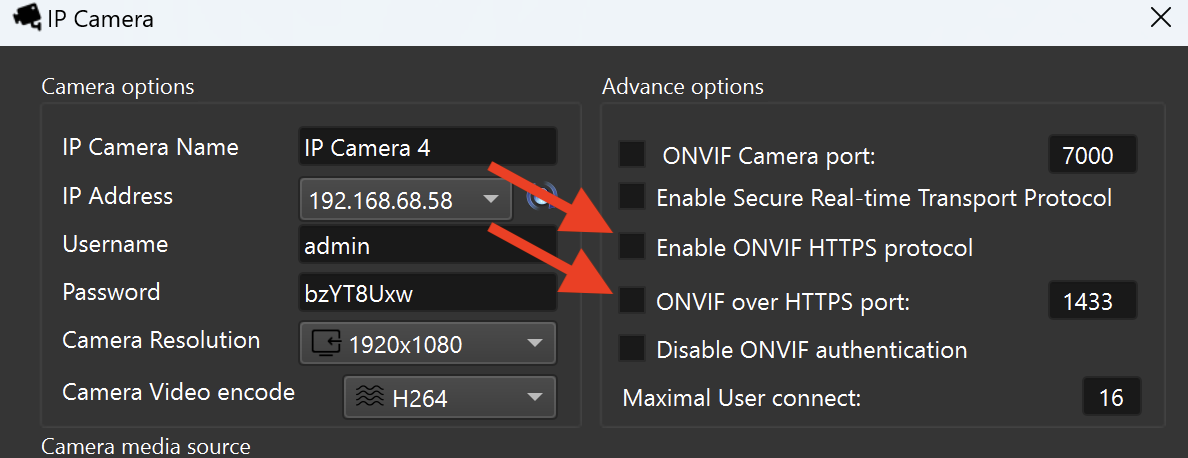
ONVIF communication is based on SOAP/XML web services. When HTTPS is enabled, all ONVIF requests and responses are encrypted.
Typical ONVIF services include:
- Device Service
- Media Service
- Event Service
- PTZ Service
- Replay Service
Example ONVIF endpoint:
https://<ITVDESK_IP>:<ONVIF_HTTPS_PORT>/onvif/device_service
Why Enable ONVIF over HTTPS
Enable ONVIF over HTTPS when:
- Security policies require encrypted management traffic
- Credentials must not be transmitted in plain text
- The environment requires compliance with security standards
- ONVIF clients should use HTTPS-based RTSP URLs by default
Effect on RTSP URLs
When ONVIF HTTPS is enabled:
- ONVIF clients receive HTTPS-based RTSP URLs
- This affects how VMS/NVR systems connect to the stream
- Playback transport may still be RTSP, RTSP over TCP, or RTSP over HTTPS
ONVIF HTTPS influences what URLs are advertised, not how playback works internally.
Configuration Notes
- ONVIF HTTP and HTTPS ports are configured separately
- HTTPS requires a valid certificate (self-signed or trusted)
- ONVIF over HTTPS is optional and not required for RTSP playback
Typical Use Cases
- Enterprise and corporate environments
- Secure VMS/NVR deployments
- Systems requiring encrypted device management
- Installations with strict compliance rules
Summary
ONVIF over HTTPS in ITVDesk provides:
- Secure device control and configuration
- Encrypted ONVIF communication
- Protection of credentials and metadata
- Compatibility with professional ONVIF clients
This option secures device management, not media transport.